The Magic of Control Statements




Key Lessons And Insights Gained From Our Previous Session
Writing and Executing Your First JavaScript Program
Understanding JavaScript Syntax and Structure
Variable Declarations: var vs let vs const
Data Types and Basic Input
01
02
03
04
, Let's Explore The Concepts We'll Use
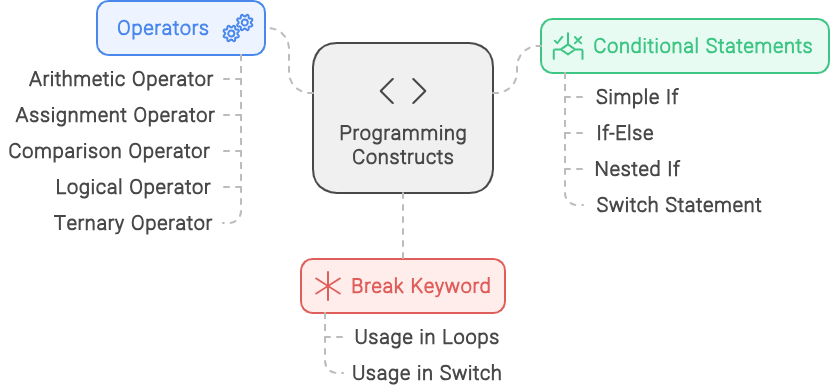
Operators
Operators
Control Statements
Control StatemenTttts
Break Keyword
Break Keyword


1
2
3
What's JS's Secret For Adding, Comparing, And Performing Magic With Your Data?

Unlocking The Magic Of JavaScript Operators
Logical Operators
Logical Operators

Ternary Operators
Ternary Operators

Assignment Operators
Assignment Operators

Comparison Operators
Comparison Operators

Arithmetic Operators
Arithmetic Operators
Unlocking The Magic Of JavaScript Operators
<script>
let a = 20;
let b = 10;
</script>
Here, we write a short code to understand operators
Here, we take the variable `a` and assign the value 20 to it
And here, we take the variable `b` and assign the value 10 to it
Now, let's perform operations on these two variables
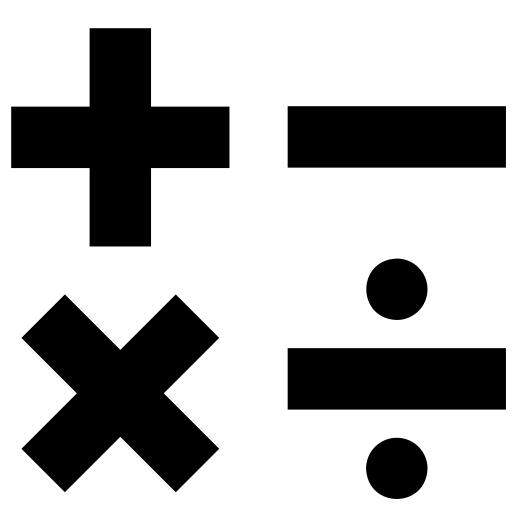
Unleashing The Math Magic Exploring In Arithmetic Operators JS
+
Addition
-
Subtraction
*
Multiplication
/
Division
%
Modulus (Remainder)
Arithmetic Operator
Unleashing The Math Magic Exploring In Arithmetic Operators JS
Output: 30
Combines a and b to give the sum (a + b)
+
Addition
<script>
let a = 20;
let b = 10;
document.write(a+b);
</script>
-
Subtraction
<script>
let a = 20;
let b = 10;
document.write(a-b);
</script>
Finds the difference between a and b (a - b)
Output: 10
Unleashing The Math Magic Exploring In Arithmetic Operators JS
*
Multiplication
<script>
let a = 20;
let b = 10;
document.write(a*b);
</script>
Multiplies a and b to give the product (a * b)
/
Division
<script>
let a = 20;
let b = 10;
document.write(a/b);
</script>
Divides a by b to give the quotient (a / b)
*
Multiplication
<script>
let a = 20;
let b = 10;
document.write(a*b);
</script>
/
Division
<script>
let a = 20;
let b = 10;
document.write(a/b);
</script>
Output: 200
Output: 2
%
Modulus (Remainder)
<script>
let a = 20;
let b = 10;
document.write(a%b);
</script>
Output: 0
Finds the remainder when a is divided by b (a % b)
Unleashing The Math Magic Exploring In Assignment Operators JS
=
Assignment
+=
Addition Assignment
-=
Subtraction Assignment
*=
Multiplication Assignment
/=
Division Assignment
%=
Remainder Assignment
Assignment Operator
Unleashing The Math Magic Exploring In Assignment Operators JS
=
Assignment
+=
Addition Assignment
<script>
let a = 20;
let b = 10;
document.write(a);
</script>
Output: 20
Assigns a value to a variable
Adds a value to a variable and assigns the result to the variable
Output: 23
<script>
let a = 20;
let b = 10;
document.write(a += 3);
</script>
Unleashing The Math Magic Exploring In Assignment Operators JS
<script>
let a = 20;
let b = 10;
document.write(a -= 3);
</script>
<script>
let a = 20;
let b = 10;
document.write(a *= 3);
</script>-=
Subtraction Assignment
*=
Multiplication Assignment
Subtracts a value from the variable and assigns the result
Multiplies the variable by a value and assigns the result
<script>
let a = 20;
let b = 10;
document.write(a -= 3);
</script>
<script>
let a = 20;
let b = 10;
document.write(a *= 3);
</script>-=
Subtraction Assignment
*=
Multiplication Assignment
Output: 17
Output: 60
<script>
let a = 20;
let b = 10;
document.write(a /= 2);
</script>
<script>
let a = 20;
let b = 10;
document.write(a %= 3);
</script>/=
Division Assignment
%=
Remainder Assignment
Divides the variable by a value and assigns the result
Finds the remainder when dividing the variable by a value and assigns the result
Unleashing The Math Magic Exploring In Assignment Operators JS
<script>
let a = 20;
let b = 10;
document.write(a /= 2);
</script>
<script>
let a = 20;
let b = 10;
document.write(a %= 3);
</script>/=
Division Assignment
%=
Remainder Assignment
Output: 10
Output: 2
Unleashing The Math Magic Exploring In Comparison Operators JS
The output of a comparison operator in JavaScript is a boolean value (`true` or `false`)
==
Equals to
!=
Not equal
>
Greater than
>=
Greater than or equal to
<
Less than
<=
Less than or equal to
Comparison Operator
Unleashing The Math Magic Exploring In Comparison Operators JS
==
Equals to
!=
Not equal
<script>
let a = 20;
let b = 10;
document.write(a == 20);
</script>
Compares two values to check if they are equal, regardless of their types
Compares two values to check if they are not equal
Output: true
Output: false
<script>
let a = 20;
let b = 10;
document.write(a != 20);
</script>
Unleashing The Math Magic Exploring In Comparison Operators JS
<script>
let a = 20;
let b = 10;
document.write(a > 20);
</script>
<script>
let a = 20;
let b = 10;
document.write(a >= 20);
</script>>
Greater than
>=
Greater than or equal to
Checks if the left operand is greater than the right operand
Checks if the left operand is greater than or equals to the right operand
Output: false
Output: true
Unleashing The Math Magic Exploring In Comparison Operators JS
<script>
let a = 20;
let b = 10;
document.write(a < 20);
</script>
<script>
let a = 20;
let b = 10;
document.write(a <= 20);
</script><
Less than
<=
Less than or equal to
Checks if the left operand is less than the right operand
Checks if the left operand is less than or equal to the right operand
Output: false
Output: true
Unleashing The Math Magic Exploring In Logical Operators JS
&&
AND
||
OR
Logical Operator
!
NOT
Unleashing The Math Magic Exploring In Logical Operators JS
&&
And Operator
Returns true if both operands are true
Output: true
<script>
let a = true;
let b = true;
document.write(a && b);
</script>
Returns true if at least one of the operands is true
Output: true
<script>
let a = true;
let b = false;
document.write(a || b);
</script>
||
OR operator
Unleashing The Math Magic Exploring In Logical Operators JS
&&
And operator
Output: false
<script>
let a = true;
let b = false;
document.write(a && b);
</script>
Output: false
<script>
let a = false;
let b = false;
document.write(a || b);
</script>
||
OR operator
Unleashing The Math Magic Exploring In Logical Operators JS
Output: false
<script>
let a = true;
let b = false;
document.write(!a);
</script>
!
NOT
Output: true
<script>
let a = true;
let b = false;
document.write(!b);
</script>
Reverses the boolean value of its operand
What's The JS Tool For Making Decisions In Your Code?

If
Nested If
If.... else
Switch
Decision-Making Magic: Mastering JS's Conditional Statements
If
Nested If
If.... else
Switch
Conditional statements
Conditional statements
Now, see how `If` works:
if(Condition) {
//code;
}
if
(Condition)
{
//code;
}
If
this condition is true,
then the block of code will execute

Now, see how `If..else` works:
if(Condition) {
//code;
}else{
//code;
}
If
if
Now, see how `If..else` works:
if(Condition) {
//code;
}else{
//code;
}
the condition is true, the block of code will execute;
(Condition) {
//code;
}
Now, see how `If..else` works:
if(Condition) {
//code;
}else{
//code;
}
else{
//code;
}
If
else, another
the condition is true, the block of code will execute;
block of code will execute

Unleashing The Math Magic Exploring In Ternary Operators JS
The ternary operator is a concise way to write conditional statements
condition ? expression1 : expression2 ;
condition ? expression1 : expression2 ;
condition is evaluated first
If true, execute expression1
If false, execute expression2
Unlocking The Power Of JS's Switch Statement
If
If.... else
Conditional statements
Conditional statements
Nested If
Switch
Before Diving Into The Code, Let's Explore Its Architecture First
Switch
switch (expression) {
case value1:
// Code to be executed if expression matches
break;
case value2:
// Code to be executed if expression matches
break;
case value3:
// Code to be executed if expression matches
break;
default:
// Code to be executed if expression doesn't match any case
}
switch evaluates an expression once and compares it with
Before Diving Into The Code, Let's Explore Its Architecture First
switch (expression) {
case value1:
// Code to be executed if expression matches
break;
case value2:
// Code to be executed if expression matches
break;
case value3:
// Code to be executed if expression matches
break;
default:
// Code to be executed if expression doesn't match any case
}
switch evaluates an expression once and compares it with each case value
Before Diving Into The Code, Let's Explore Its Architecture First
switch (expression) {
case value1:
// Code to be executed if expression matches
break;
case value2:
// Code to be executed if expression matches
break;
case value3:
// Code to be executed if expression matches
break;
default:
// Code to be executed if expression doesn't match any case
}
Assume, if it matches `value2`, this block of code executes
Before Diving Into The Code, Let's Explore Its Architecture First
switch (expression) {
case value1:
// Code to be executed if expression matches
break;
case value2:
// Code to be executed if expression matches
break;
case value3:
// Code to be executed if expression matches
break;
default:
// Code to be executed if expression doesn't match any case
}
If not, it exits the current 'case' block or loop due to the 'break' keyword
Before Diving Into The Code, Let's Explore Its Architecture First
switch (expression) {
case value1:
// Code to be executed if expression matches
break;
case value2:
// Code to be executed if expression matches
break;
case value3:
// Code to be executed if expression matches
break;
default:
// Code to be executed if expression doesn't match any case
}
`default` provides a fallback option executed when no `case` matches the evaluated expression
Let's Summarized It!
Summary
5
Control statements make programs dynamic and logical
4
switch is useful for multiple fixed conditions
3
Loops help repeat tasks efficiently
2
Conditional statements decide which code runs
1
Control statements manage the flow of execution in JavaScript
Quiz
A. stop
B. exit
C. break
D. continue

What keyword is used to stop the execution of a loop completely?
Quiz-Answer
What keyword is used to stop the execution of a loop completely?
A. stop
B. exit
C. break
D. continue
