


Content ITV PRO
This is Itvedant Content department
Extra Session Instructions
Extra Hours
If additional hours are required to complete any pending or lengthy topic, Mark the session under Extra Hours under the following scenarios:
Extra Session Instructions
a. Revision Sessions
When a revision session is conducted for previously taught content, Mark the session under Extra Hours.
b. Alternate Sessions
If a session is conducted as an alternate for a cancelled lecture to avoid cancellation and utilize learners' time, Mark the session under Extra Hours.
Module Assessment Attendance
Used to mark the attendance of learners for the Module Assessment conducted as part of the training program.
Extra Session Instructions
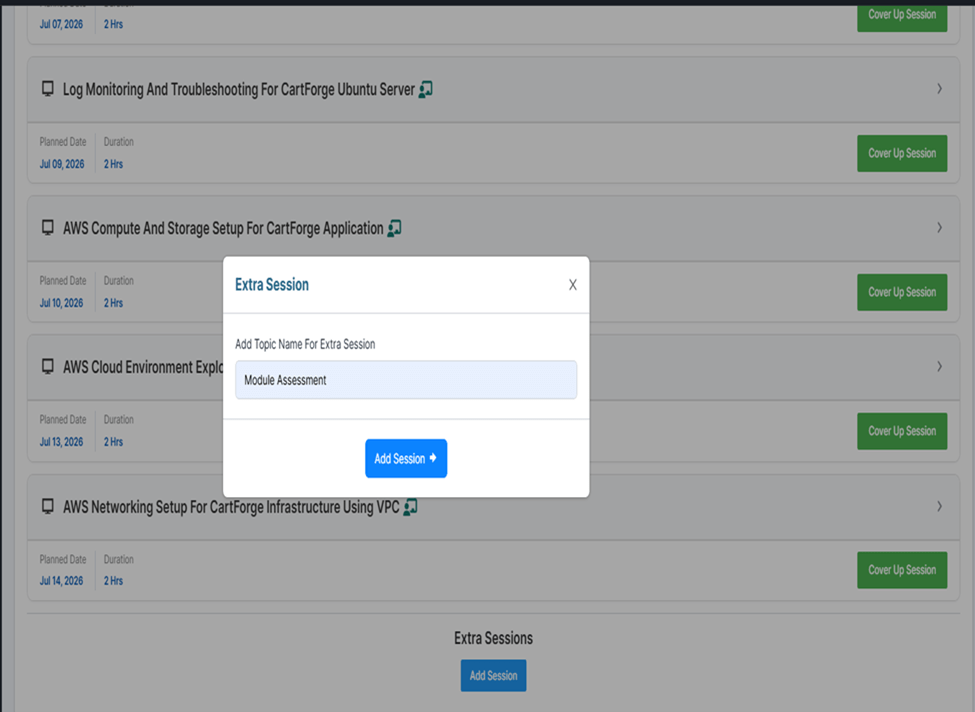
Steps to add extra sessions
1. a) Click the 'Add Session' button
b) The screen shown below will be displayed.
c) Enter the Topic Name, and then click the Add Session button to create the session
Extra Session Instructions
2. a) Extra session will be added and you will get the start button
b) Follow the “Starting Lecture and Marking Attendance” process
Important Note :
Always update the attendance for extra sessions, just like regular sessions.
Mention the purpose of the extra session (e.g., "Revision", "Topic Completion", "Cancelled Class Recovery- GIT Session") in the topic name section.
By Content ITV