Ship Real Agents
Hands-on evals for agentic applications
AIE Europe 2026-04-08

What are we talking about?
- What is an eval, and why you need them
- Setting up tracing with Phoenix
- Building an AI agent with the Claude Agent SDK
From data to evals
- Looking at your data: error analysis
- Code evals and built-in LLM evals
- Writing custom eval rubrics
- Meta-evaluation: testing your tests
From evals to experiments
and beyond
- Datasets, experiments, and the improvement cycle
- A look at what comes next
Get set up
- Learner notebook: bit.ly/build-real-agents
- Claude API key: platform.claude.com/settings/keys
- Phoenix Cloud account: app.phoenix.arize.com/login/sign-up
- Phoenix hostname: app.phoenix.arize.com/s/yourusername
- Phoenix API key: app.phoenix.arize.com/s/yourusername/settings/general
These slides: slides.com/seldo/ship-real-agents

1. Notebook

3. Phoenix cloud

2. Claude key
What is an eval?
Traces are logs,
evals are tests
- Traces = logs, for AI
- Evals = tests, for AI
Spans: the building blocks
- Each span = one step in execution
- LLM call, tool call, agent turn
- Records input, output, timing, token counts
The vibes problem
What you can't do without evals
- Can't detect regressions when you change a prompt
- Can't compare prompt versions objectively
- Can't know if a new model is actually better
- Can't run quality gates in CI
You can't switch models without evals
- New models drop every few months
- Without evals, switching = weeks of manual testing
- With evals, you know within hours
This is not theoretical
Everybody vibes until they can't any more
Two types of evals
- Code evals — deterministic, free, fast
- LLM-as-a-judge — semantic, flexible, powerful
LLM-as-a-judge evals
- A second LLM grades outputs against a rubric
- Handles meaning, not just strings
- Non-deterministic — needs calibration
LLM judges: tradeoffs
When to use which
- Code evals → format, structure, constraints
- LLM judge → accuracy, relevance, tone, faithfulness
- Human review → novel failures, calibrating judges
Why agents make this harder
- Single LLM call: input → output. Done.
- Agent: input → tool call → result → reasoning → another tool call → output
- Errors cascade. Each step can go wrong.
Multi-agent complexity
- Handoffs between agents add another layer
- Triage routing, specialist handling
- Each layer = new ways things can go wrong
Cascading failures
- Bad retrieval → bad reasoning → confidently wrong output
- The user sees a polished response and trusts it.
- This is worse than an obvious failure.
Creatively correct vs. wrong
- Sometimes the agent finds a better solution
- Your eval says "fail" — but the agent was right
- Evals need to distinguish creative from wrong
Another way
to categorize evals
- Capability evals: can it do this new thing?
- Regression evals: can it do the stuff it used to do?
What an eval result looks like
Code eval:  score: 1 · label: "valid"
LLM judge:  score: 0 · label: "incorrect"
            explanation: "The response fails to include..."
What a real explanation
looks like
label: "incorrect"
explanation: "The response fails to include a budget
breakdown, which is a core requirement. The agent
provides destination info and local recommendations
but omits all cost estimates, making the plan
incomplete for a user who asked specifically
about budget travel to Tokyo."
Explanations make evals actionable
- Concrete failure → you know what to fix
- Same explanation across 50 traces = systematic problem
- Evals become a debugging tool, not just a scoreboard
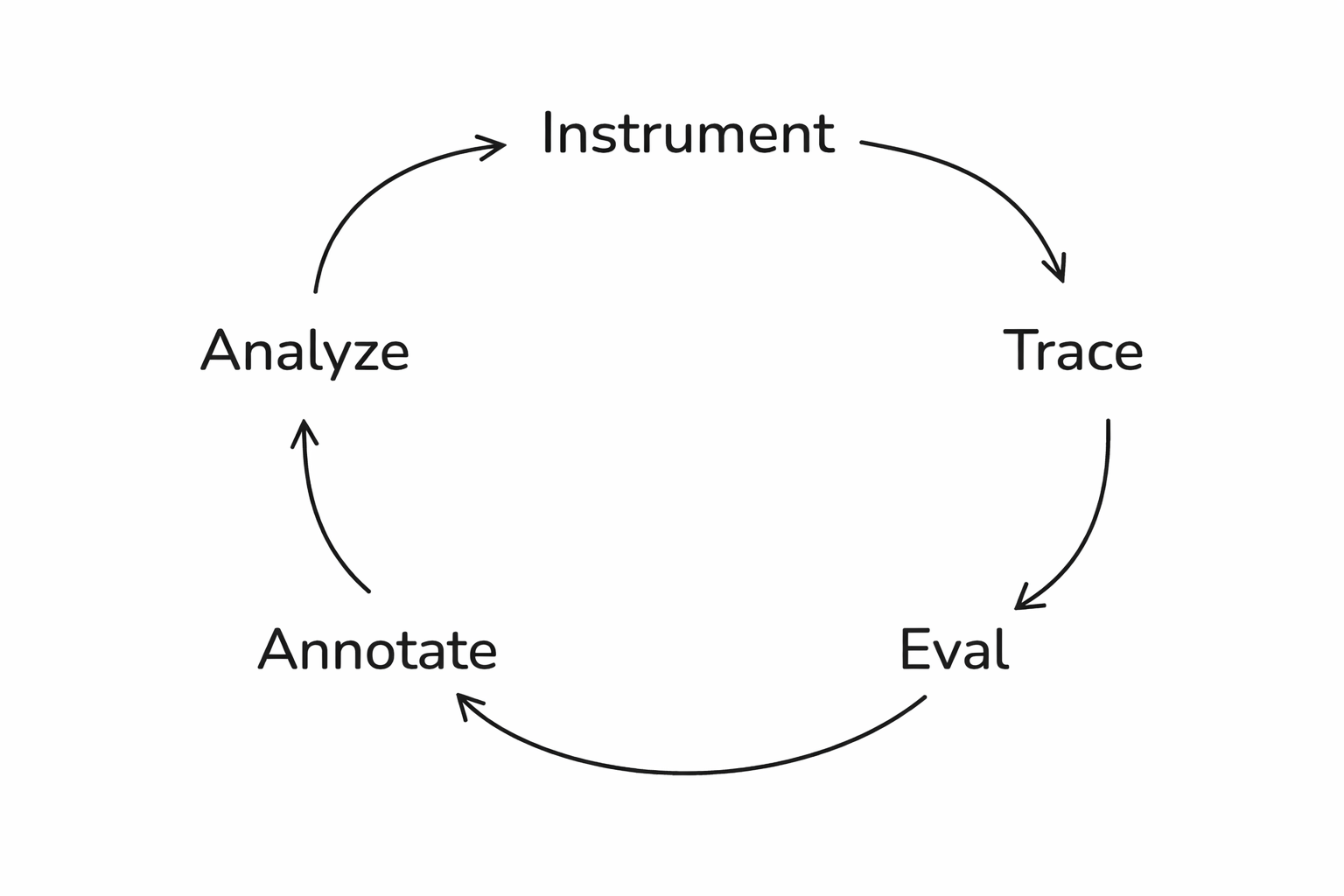
The full loop
Setting up Phoenix
Step 1: Tracing
What is Phoenix?
- Open-source AI observability platform
- Captures traces from any AI framework
- Free cloud tier at app.phoenix.arize.com
Open the notebook
Install dependencies
pip install claude-agent-sdk
  openinference-instrumentation-claude-agent-sdk
  arize-phoenix anthropic
The Claude Agent SDK
- Anthropic's framework for building agents
- Tool use, web search, conversation context
- Auto-instrumented by OpenInference
What are we building?
- A financial analysis chatbot
- Two-turn agent: research then write
- Web search tool for real financial data
- Traces everything to Phoenix automatically
How the two turns connect
- Two-turn architecture: research → write
- Claude SDK saves context between turns
- Phoenix traces every step automatically
Set your API keys
from google.colab import userdata
os.environ["ANTHROPIC_API_KEY"] = "sk-ant-XXXX"
os.environ["PHOENIX_API_KEY"] = "YYYY"
os.environ["PHOENIX_COLLECTOR_ENDPOINT"]
  = "https://app.phoenix.arize.com/s/yourusername/"
Register the tracer
from phoenix.otel import register
register(
    project_name="aie-claude-financial-agent",
    auto_instrument=True
)
Build the agent
A financial analysis chatbot
The agent setup
from claude_agent_sdk import ClaudeSDKClient,
    ClaudeAgentOptions, AssistantMessage, TextBlock
options = ClaudeAgentOptions(
    model="claude-haiku-4-5-20251001",
    allowed_tools=["WebSearch"],
    permission_mode="acceptEdits",
)
The two-turn pattern
RESEARCH_PROMPT = "Research {tickers}. Focus on: {focus}.
    Use web search to find current financial data."
WRITE_PROMPT = "Now write a concise financial report
    based on your research above."
The financial_report function
async def financial_report(tickers, focus):
    async with ClaudeSDKClient(options=options) as client:
        await client.query(RESEARCH_PROMPT.format(...))
        async for message in client.receive_response():
            ...  # research completes
        await client.query(WRITE_PROMPT)
        async for message in client.receive_response():
            ...  # collect the report
        return report
Wrapping it in a span
with tracer.start_as_current_span(
        "financial_report",
        attributes={
            "input.value": f"Research: {tickers}\nFocus: {focus}",
        },
    ) as span:
Run it!
result = await financial_report(
    "TSLA",
    "financial performance and growth outlook"
)
print(result)
Non-deterministic by design
Why this needs evals
Look at the trace
Traces reveal every decision
What lives in a span
- kind: AGENT
- attributes.input.value: "Research: TSLA\nFocus: financial..."
- attributes.output.value: "# TESLA, INC. (TSLA)..."
- start_time, end_time, duration
Generate test data
Here's one I made earlier
Test queries
test_queries = [
    {"tickers": "AAPL", "focus": "revenue growth"},
    {"tickers": "NVDA", "focus": "AI chip demand"},
    {"tickers": "AMZN", "focus": "AWS performance"},
    {"tickers": "GOOGL", "focus": "advertising revenue"},
    {"tickers": "MSFT", "focus": "cloud computing segment"},
    {"tickers": "META", "focus": "metaverse investments"},
    {"tickers": "TSLA", "focus": "vehicle deliveries"},
    {"tickers": "RIVN", "focus": "financial health"},
    {"tickers": "AAPL, MSFT", "focus": "comparative analysis"},
    {"tickers": "NVDA", "focus": "competitive landscape"},
    {"tickers": "KO", "focus": "dividend yield"},
    {"tickers": "AMZN", "focus": "profitability trends"},
]
Covering the edge cases
Traces are loaded
Start with data, not metrics
Read your traces before you write evals
You need requirements first
- You can't say "it doesn't work" if you haven't defined what "works" looks like
- Write down explicit success criteria
Defining success is cross-functional work
Where to get test data
- Before production: synthetic data (LLM-generated queries)
- After production: real user queries from traces
- Diversity is critical — vary phrasing, intent, complexity
Don't forget the edge cases
Examine traces
When the data looks right
but isn't
The "confidently wrong" problem
Categorize by root cause
- "The response was wrong" — not actionable. Ask why.
- Retrieval failure → better search
- Reasoning error → better prompts
- Hallucination → grounding checks
- Scope violation → explicit boundaries
- Formatting / tone → output guardrails
Categorize what we found
trace_categories = {
    "TSLA performance": "looks good",
    "NVDA competitive": "possible hallucination",
    "AAPL vs MSFT": "reasoning gap",
    "RIVN financial health": "looks good",
    ...
}
What the frequency table
tells you
Category counts:
looks good                5  █████
possible hallucination    3  ███
reasoning gap             2  ██
unverifiable data         1  █
missing recommendation    1  █
Frequency x Severity = Priority
The Swiss Cheese Model
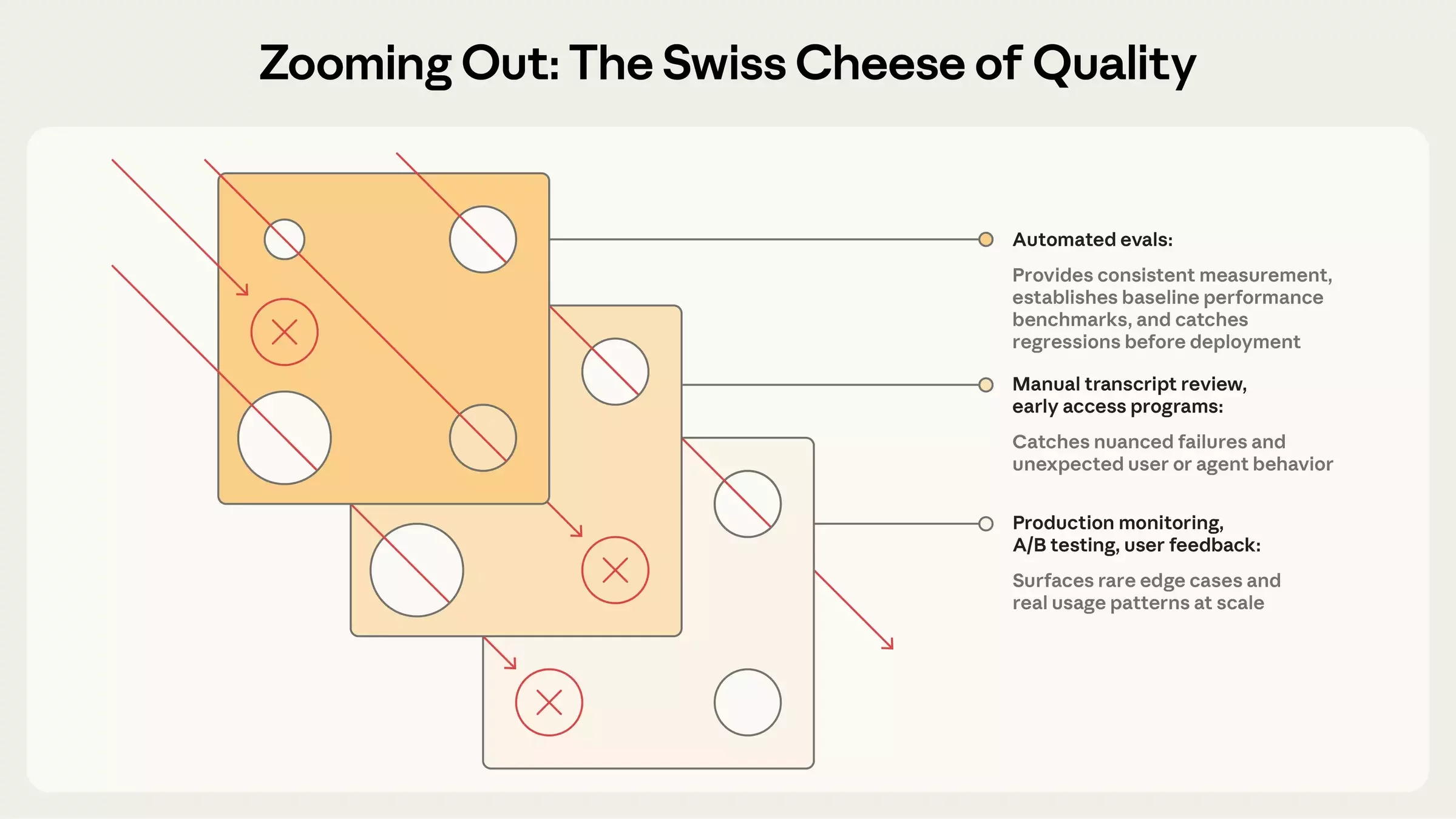
Stack your eval layers
Evaluations
Step 4: Code evals
The simplest useful eval
Get your spans
from phoenix.client import Client
px_client = Client()
spans_df = px_client.spans.get_spans_dataframe(
    project_name="aie-claude-financial-agent"
)
parent_spans = spans_df[
    spans_df["parent_id"].isna()
]
parent_spans.rename(columns={
    "attributes.input.value": "input",
    "attributes.output.value": "output"
}, inplace=True)
Ticker check eval
from phoenix.evals import create_evaluator
@create_evaluator(name="mentions_ticker", kind="code")
def mentions_ticker(input, output):
    tickers = re.findall(r"\b([A-Z]{1,5})\b", input)
    likely_tickers = [t for t in tickers
        if len(t) >= 2 and t not in ("AI", "US", ...)]
    missing = [t for t in likely_tickers
               if t not in output.upper()]
    if not missing:
        return {"label": "pass", "score": 1}
    return {"label": "fail", "score": 0,
        "explanation": f"Missing: {', '.join(missing)}"}
How the ticker check works
Running the ticker check
Why this matters
Code evals
aren't just toy examples
- Did the output parse as JSON?
- Is the response under 500 tokens?
- Does it avoid forbidden phrases?
Grade what was produced,
not the path
- Don't check that the agent followed specific steps
- Agents find valid approaches you didn't anticipate
- Check the outcome, not the trajectory
Check the outcome,
not the trajectory
Step 5: Built-in LLM evals
What code can't check
Three components
- A judge model (the LLM that grades)
- A prompt template (the rubric)
- Data (the examples being evaluated)
Phoenix ships built-in evals
- Correctness, Faithfulness, Conciseness
- Tool Selection, Tool Invocation
- Document Relevance, Refusal
- No prompt engineering required
Tool selection evals
Set up the judge
from phoenix.evals import LLM
from phoenix.evals.metrics import CorrectnessEvaluator
llm = LLM(model="claude-sonnet-4-6", provider="anthropic")
correctness_eval = CorrectnessEvaluator(llm=llm)
Run the evaluation
from phoenix.evals import evaluate_dataframe
from phoenix.trace import suppress_tracing
with suppress_tracing():
    results_df = evaluate_dataframe(
        dataframe=parent_spans,
        evaluators=[correctness_eval]
    )
Log the results
from phoenix.evals.utils import to_annotation_dataframe
evaluations = to_annotation_dataframe(dataframe=results_df)
Client().spans.log_span_annotations_dataframe(
    dataframe=evaluations
)
Every score is zero
Faithfulness:
Giving the judge context
- Correctness: "Is this factually accurate?" (no context)
- Faithfulness: "Does this stick to the source material?" (with context)
- The difference: faithfulness gets the research the agent found
- Not always better; more appropriate for this use case
How faithfulness works
- FaithfulnessEvaluator needs three columns:
- input: the user's query
- output: the agent's response
- context: the source material to check against
Extract research context
child_spans = spans_df[spans_df["parent_id"].notna()]Run faithfulness
from phoenix.evals.metrics import FaithfulnessEvaluator
faithfulness_eval = FaithfulnessEvaluator(llm=llm)
with suppress_tracing():
    faith_results = evaluate_dataframe(
        dataframe=parent_spans,
        evaluators=[faithfulness_eval]
    )
Faithfulness results
Two built-in evals, two different signals
- Correctness: 0/13 passed — eval doesn't fit the use case
- Faithfulness: 13/13 passed!
- Choosing the right eval matters more than tuning it
What you see
Built-in evals
are your starting point
Step 6: Custom eval rubrics
Five parts
of a good eval prompt
- Define the judge's role
- Explicit CORRECT / INCORRECT criteria
- Present the data clearly
- Add labeled examples
- Constrain the output labels
Part 1: Define the role
"You are an expert financial analyst evaluator.
Your task is to judge whether a financial report
provides actionable investment guidance,
not just raw data."
Part 2: Explicit criteria
- ACTIONABLE — The report:
- Contains specific recommendations (buy/sell/hold or equivalent)
- Identifies concrete risks with supporting data
- Includes forward-looking analysis, not just historical data
- Provides context for *why* recommendations are made
- NOT ACTIONABLE — The report:
- Only summarizes publicly available data without interpretation
- Lacks specific recommendations or next steps
- Presents risks without supporting evidence
- Contains only backward-looking analysis
What makes criteria specific
- ACTIONABLE — The report:
- Contains specific recommendations (buy/sell/hold or equivalent)
- Identifies concrete risks with supporting data
- Includes forward-looking analysis, not just historical data
- Provides context for *why* recommendations are made
Criteria come from
error analysis
Part 3: Present the data
- [BEGIN DATA]
- ************
- User query: {input}
- ************
- Financial Report: {output}
- ************
- [END DATA]
Part 4: Add examples
An actionable example
Example — ACTIONABLE:
"Based on NVDA's 122% YoY revenue growth driven by
data center demand, strong forward P/E of 35x relative
to sector median of 22x, and expanding margins, NVDA
presents a compelling growth position. Key risk:
concentration in AI training chips (~70% of revenue).
Recommendation: accumulate on pullbacks below $800."
A not-actionable example
Example — NOT ACTIONABLE:
"NVDA is a major player in the semiconductor industry.
The company has seen significant growth in recent years
driven by AI demand. NVDA's stock has performed well.
Investors should consider various factors when making
investment decisions."
Part 5: Constrain the output
- "Based on the criteria above,
- is this financial report ACTIONABLE or NOT ACTIONABLE?"
Chain-of-thought for judges
The full template
actionability_template = """
You are an expert financial analyst evaluator...
ACTIONABLE — [criteria]
NOT ACTIONABLE — [criteria]
[examples]
[BEGIN DATA]
User query: {input}
Financial Report: {output}
[END DATA]
Is this report ACTIONABLE or NOT ACTIONABLE?
"""
How the template flows
- Role definition
- Explicit criteria
- Labeled examples
- Data section with delimiters
- Constrained output question
Wire it up
actionability_eval = ClassificationEvaluator(
    name="actionability",
    prompt_template=actionability_template,
    llm=llm,
    choices={"actionable": 1.0, "not actionable": 0.0},
)
with suppress_tracing():
    action_results_df = evaluate_dataframe(
        dataframe=parent_spans,
        evaluators=[actionability_eval]
    )
Log and review
action_evaluations = to_annotation_dataframe(
    dataframe=action_results_df
)
Client().spans.log_span_annotations_dataframe(
    dataframe=action_evaluations
)
Read the explanations
Treat eval prompts like code
- Version them. Test them against known answers.
- Use Phoenix's prompt playground for fast iteration.
- An eval you haven't validated
- is just a fancy way of being wrong at scale.
The God Evaluator anti-pattern
- Don't build one eval that checks everything
- One evaluator per dimension
- Guardrails vs. north-star metrics
One evaluator per dimension
Guardrails vs.
north-star metrics
Can you trust your judges?
Meta-evaluation
Your judge is a classifier
- It makes predictions: pass or fail
- Predictions can be compared against ground truth
- Your job: check the judge's homework
Human judgement
is a lot of work
Building your golden dataset
Write unambiguous tasks
- If 0% pass rate on many trials → broken task, not broken agent
- Each task needs a reference solution
- Test when a behavior SHOULD occur AND when it shouldn't
The golden set grows over time
Dev/test splits for your labels
Run the judge on the same examples
- actionability results on the labeled subset
- Compare: judge label vs. human label
Where they agree and disagree
Fixing the rubric
- Disagreement → read the explanation → find the ambiguity → tighten the criteria
- "Forward-looking analysis" → "Forward-looking analysis WITH specific recommendations"
Rubric iteration
Precision and recall
| Positive | Negative | |
|---|---|---|
| Positive | True positive ✅ | Miss ❌ |
| Negative | False positive ❌ | True negative ✅ |
Actual
Predicted
Precision = True positives / (true positive + false positive)
Recall = True positives / (true positive + false negative)
- High precision means you minimize false positives
- High recall means you minimize misses
Precision and recall
Precision: when the judge says "fail," is it right?
Recall: of all real fails, how many does it catch?
Prioritize recall — catching defects matters more
  than occasional false positives
Interpreting precision and recall
Prioritize recall
Judge pitfalls
- Position bias — judges favor the first or last option
- Length bias — longer responses score higher
- Confidence bias — fooled by confidently wrong answers
- Self-preference — same model rates its own output higher
Mitigating self-preference bias
Detecting judge bias
The benchmark is human performance
- Human inter-rater reliability: often 0.2–0.3 (Cohen's Kappa)
- If your judge is more consistent than humans, that's a win
Failures should seem fair
- When a task fails, is it clear what the agent got wrong?
- If scores don't climb, is the eval at fault?
- Reading transcripts is how you verify
The CORE-Bench story
The lesson: verify your evals
Datasets and experiments
Step 7: Iterate
The problem with one-off fixes
Save failures as a dataset
Save passing traces too
Improve the agent
IMPROVED_RESEARCH_PROMPT = """Research {tickers}.
    Focus on: {focus}.
    You MUST include:
    - Specific financial ratios (P/E, P/B, debt-to-equity)
    - News from the last 6 months
    - Current stock price or recent performance data
    - Competitive context and market positioning"""
IMPROVED_WRITE_PROMPT = """Write a concise financial report.
    The report MUST be actionable. Specifically:
    - Include explicit buy/sell/hold recommendations
    - Identify concrete risks with supporting data
    - Include forward-looking analysis
    - Provide context for WHY each recommendation is made"""
Every change maps to a finding
Data-driven prompt engineering
Run an experiment
dataset = Client().datasets.get_dataset(
    dataset="aie-financial-agent-fails"
)
async def my_task(example):
    return await improved_financial_report(
        tickers, focus
    )
experiment = await async_client.experiments.run_experiment(
    dataset=dataset,
    task=my_task,
    evaluators=evaluators
)
The task function
The task abstraction
What experiments show you
- Same inputs, same evaluators, different agent version
- The only variable is your change
- Side-by-side comparison, example by example
Dealing with non-determinism
Compare the results
The eval-iterate cycle
Find failures → Read explanations → Fix the prompt → Run experiment → Repeat
How many samples do you need?
- 200 samples, 3% defect rate → 95% CI: 0.6%–5.4%
- 400 samples → 95% CI: 1.3%–4.7%
- More samples = tighter confidence, but diminishing returns
Diminishing returns in sample size
- Double to 400 samples → 95% CI: 1.3%–4.7%
- Halving margin of error requires 4x the samples
Practical sample size guidance
- Workshop experiments: 12–20 examples for directional signal
- Shipping decisions: 200–400 samples
Making the cycle systematic
Where to invest your effort
The impact hierarchy
- Data quality fixes (highest impact)
- Prompting improvements
- Model selection
- Hyperparameter tuning (lowest impact)
Model selection and tuning
- Model upgrades: sometimes necessary, always costly
- Hyperparameter tuning: lowest impact, try last
Eval-driven development
- Write the eval first, then build the feature
- Like test-driven development, but for AI
- The eval defines what "done" means
Eval-driven development in practice
- Claude Code evolved this way — evals before capabilities
- Non-engineers can define evals too
Who can write evals?
- Non-engineers can define evals
- Product managers, customer success, even salespeople
The data flywheel
- Log → Sample → Review → Improve → Repeat
- Each iteration compounds
- Production failures become tomorrow's test cases
Model adoption advantage
- Teams with evals upgrade models in days
- Teams without face weeks of manual testing
Beyond the workshop
What to explore next
Production monitoring
- Run evals on sampled live traffic
- Alert on sustained score drops, not individual failures
- Route production failures back into your test suite
Cost-aware evaluation
- Not every query needs a frontier model
- Cost-Normalized Accuracy: accuracy ÷ cost
- An agent that's 92% accurate at $0.02/query may beat one that's 95% accurate at $0.15/query
Cost-Normalized Accuracy
- Accuracy ÷ cost = value per dollar
- 92% at $0.02/query can beat 95% at $0.15/query
Pairwise evaluation
- "Is A better than B?" is more reliable than "Rate A from 1-10"
- Run twice with order swapped to control for position bias
Reliability scoring
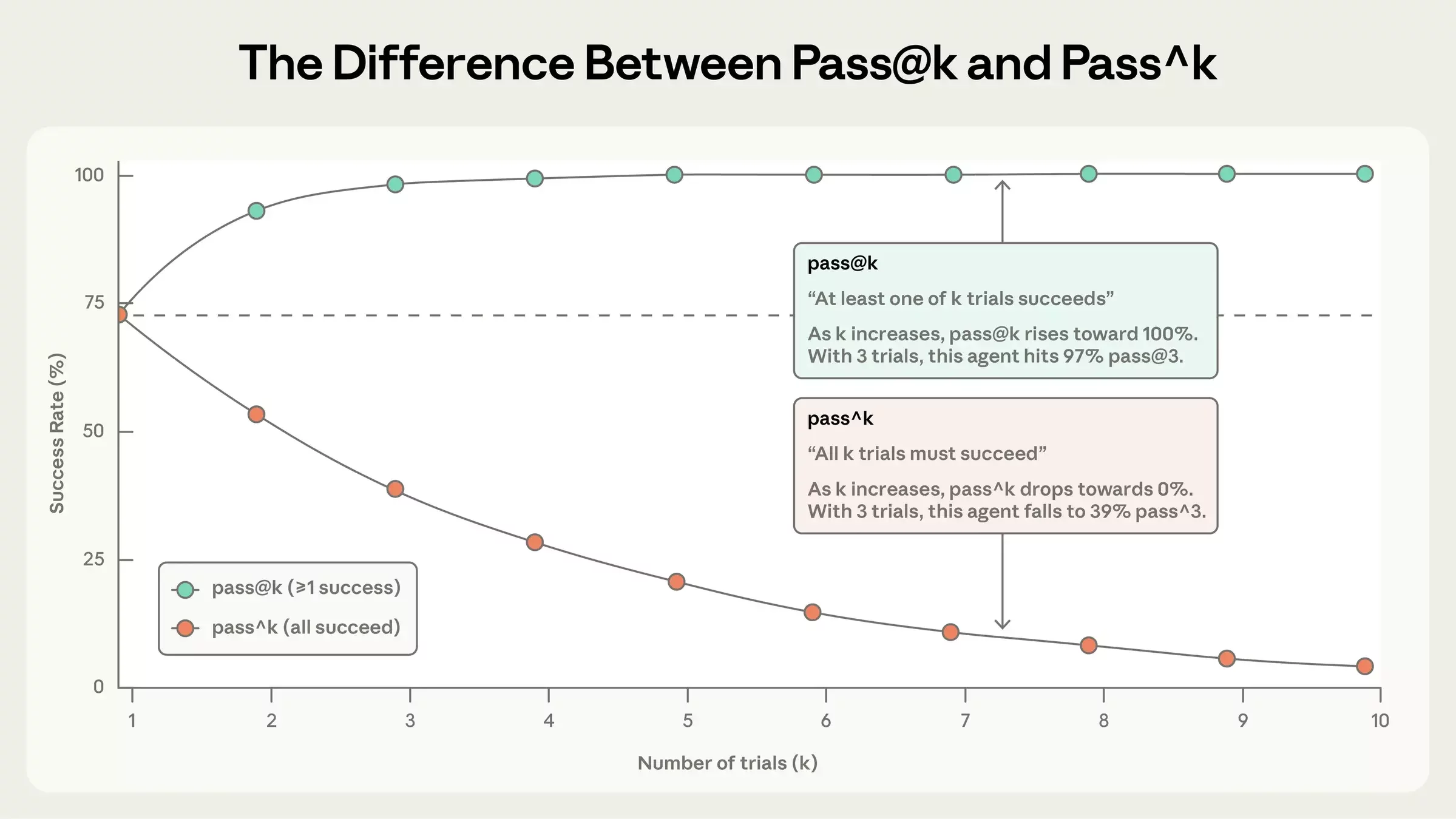
The frontier
- Multi-judge systems — consensus reduces bias
- Agent-as-a-judge — judges with tools
- Benchmark saturation — when evals need to get harder
What we built today
Start small
Evals are infrastructure
- Treat evals as a core part of your system, not an afterthought
- The value compounds — but only if you keep investing
Go try it
- app.phoenix.arize.com
- arize.com/docs/phoenix
- github.com/Arize-ai/phoenix
Arize AX
- Enterprise SAML, SSO
- Compliance: SOC2 etc.
- ADB: billions of rows
- Session-aware agent tracing
- Alyx: AI assistant
- Agent graphs
- Metrics
- Dashboards
- Monitoring
Thank you!
🦋 @seldo.com on BlueSky
arize.com/docs/phoenix
These slides:
Ship Real Agents (AIE Europe)
By Laurie Voss